
Accent Color
GitHub
Tsugawa YT Insights Logo Built for Creators.

YouTube Analytics, Simplified and Intuitive.
Tsugawa YT Insights

A WordPress plugin that integrates the YouTube Data API and Analytics API, allowing creators and bloggers to intuitively analyze channel data. No data analysis expertise or complex configurations are required. Completely free, secure, and open-source.

Signature Story

Tsugawa YT Insights LogoDevelopment Story & Dedication

As content creators, we often ask ourselves questions like: "When exactly do my videos perform best?"
"What patterns or commonalities lie within my past successes?"
"How can I leverage my accumulated video library to discover my next big step?"

As a channel grows and the number of videos increases, simply checking individual real-time metrics makes it harder to see the overarching trends and growth patterns that define long-term success.

"What if there was a dashboard within WordPress—the tool you use every day—that could safely and intuitively track your channel's progress?"

This simple desire and commitment to details was the starting point for "Tsugawa YT Insights". By seamlessly merging the YouTube Data API (public data) and the Analytics API (private detailed metrics), it creates a powerful analytics environment directly on your WordPress site.

“This is a secure analytics tool that completely eliminates unnecessary external connections and fully respects personal data privacy.”

Instead of relying on third-party analytics services and handing over your data, you can keep and utilize your valuable information locally. High security and absolute respect for data ownership are the core design philosophies of this plugin.

This plugin is published as an open-source project (GPL license) and is completely free of charge. For all creators who passionately share their content through video production, blogging, or other mediums, we hope this tool serves as a compass for your next steps.
Who It Is For

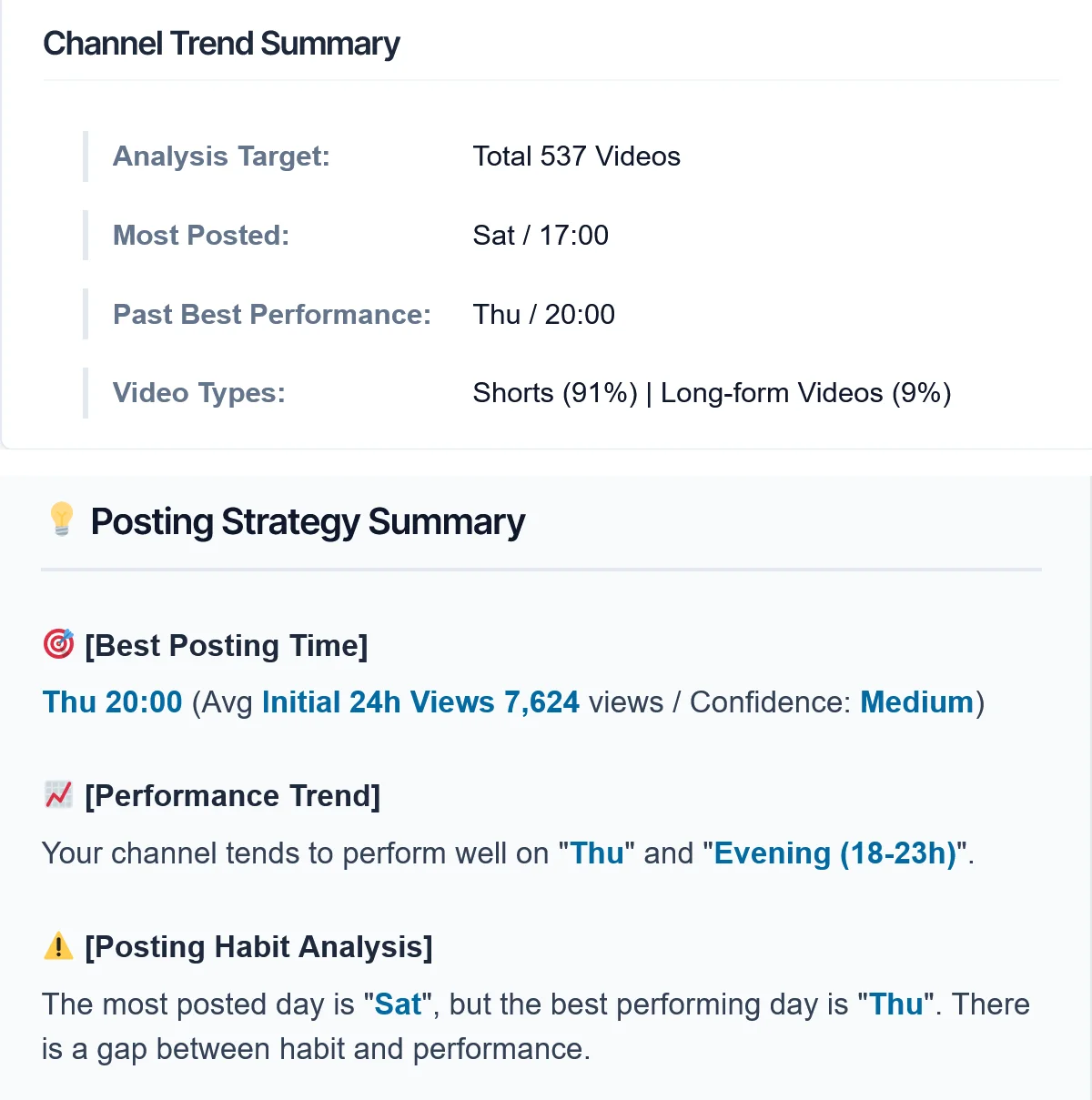
This plugin is designed for creators who want to analyze posting patterns and growth trends from historical YouTube channel data.

Over 100 Uploaded Videos: The accuracy of the analytics improves with more videos. We extract clear patterns and growth trends from historical data that otherwise go unnoticed.
Review Past Posting Patterns: See exactly what video formats and posting schedules contributed to short-term and long-term growth. Base your strategy on concrete data rather than gut feeling.
Find YouTube Studio Hard to Use: You don't need to open external dashboards. Check your channel's metrics directly inside the familiar WordPress dashboard while writing your blog posts.
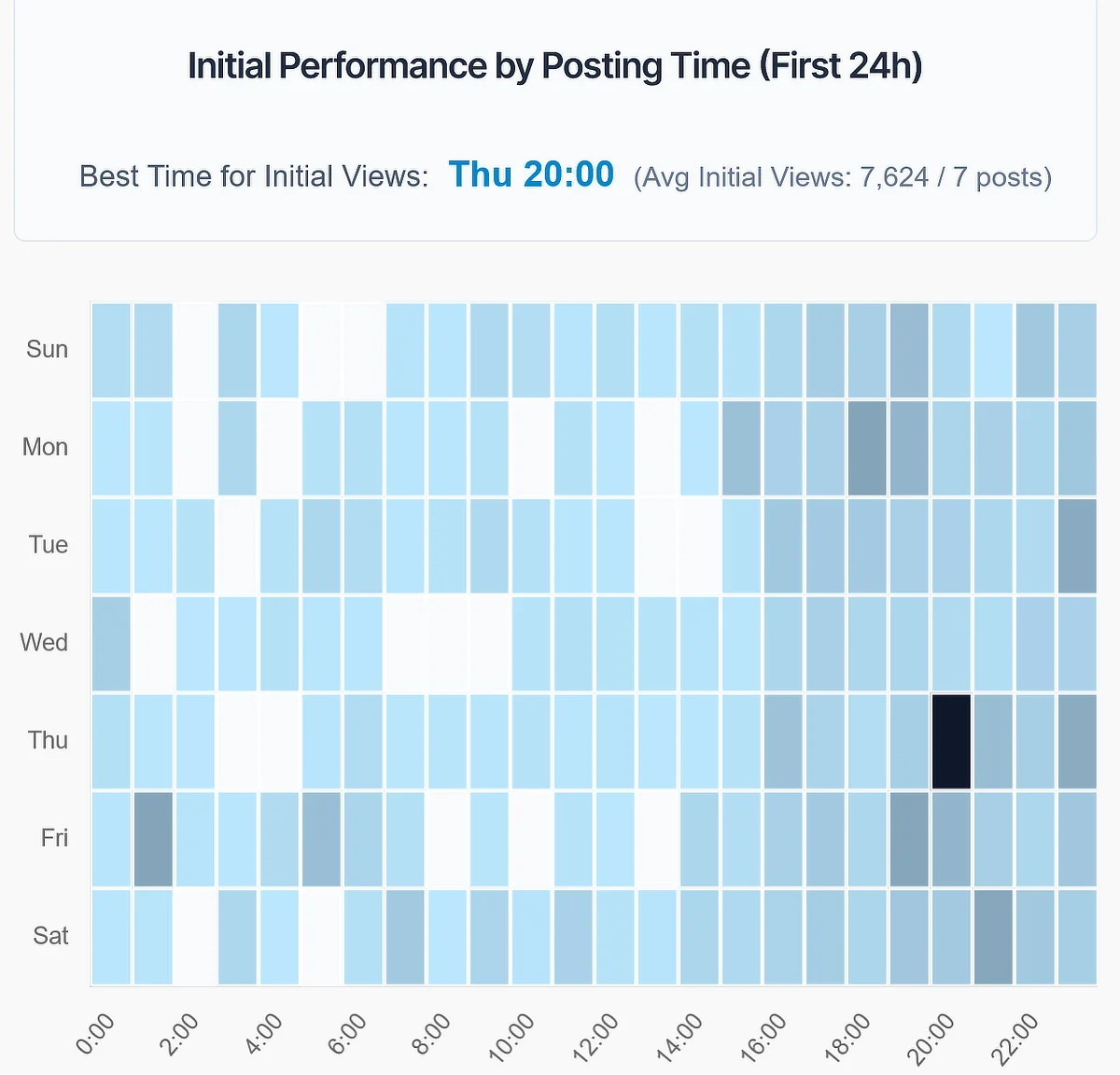
Analyze Upload Times and Formats: Our custom heatmaps and metrics visualize performance differences by day of the week and hour. Instantly find and analyze the best posting times.

Product Features

Engineered to run securely and lightweight in your WordPress environment while delivering powerful channel insights.

Channel-Wide Analytics

View overall growth trends from your accumulated video data at a glance, revealing the bigger picture that individual video metrics might miss.

Post Trends & Recommendations

Compare performance variations across different days and hours using heatmaps. Let the data suggest when it is most effective to post and optimize your future strategy.

Format Comparison

Compare performance trends between Shorts and long-form videos. Understand how each format contributes to your overall channel growth.

Seamless API Integration

Integrates the YouTube Data API (public data) and the Analytics API (private insights). Understand viewer behavior on a deeper level to plan your next action.

Guided Onboarding

Features a guided setup wizard so you won't get lost obtaining API keys or configuring OAuth settings. Get connected easily and safely.

Frontend Dashboard

No need to jump between complex administrative menus. Simply insert the shortcode [tsugawa_yt_insights_app] on any page or post to display the dashboard.

Clean Web Standards

Built following clean, standard coding practices that avoid DOM hacking. Integrates safely without conflicts with themes or other plugins.

Privacy First

Completely eliminates unnecessary external requests and never sends your data to third parties. All processing is kept secure inside your WordPress server.

Free & Open Source

Published under the GPL license to support content creators. Enjoy full features without any hidden paywalls, limitations, or subscription fees.

Two Integration Steps to Match Your Depth

Choose the integration level that fits your goals, whether you want a quick start or a deep dive.

Step 1: Quick Overview

YouTube Data API (Public Data)

Start instantly by pasting your API key and channel ID. Analyzes publicly available YouTube metrics. Perfect for those who want a quick, hassle-free setup.

Automatic retrieval of videos from your channel
Basic metrics including publish date, upload time, and view counts
Clear performance comparison across different video formats
An automated posting strategy summary based on channel data

Step 2: Deep Insights

Analytics API OAuth (Private Data)

Authenticate securely via OAuth using your Google account. Pulls private analytics metrics that only you can access from YouTube Studio for advanced tracking.

Track initial performance during the critical first 24 hours after publishing
Pinpoint optimal upload times and analyze your posting habits
Deep performance comparisons between different video types
Advanced heatmaps to identify overall growth patterns
[IMPORTANT] Security Notice The API Key and OAuth Client ID / Secret required for this plugin are highly sensitive credentials tied to your Google account. Please ensure you NEVER do the following:
  • Include them in screenshots of setup tutorials or blog posts
  • Expose them in video guides on YouTube
  • Share them with anyone else
* Leakage of credentials may result in unauthorized API usage by third parties. Please handle them with extreme care.

Installation

Setting up the plugin is extremely simple. Just upload the ZIP file, activate it, and get started.

01
01

Get the Files

Visit the GitHub Releases page and download the latest version of tsugawa-yt-insights.zip.

02
02

Install to WordPress

Go to your WordPress Admin Panel > "Plugins" > "Add New" > "Upload Plugin". Select the downloaded ZIP file and click "Install Now".

03
03

Activate & Setup

Click "Activate Plugin". Follow the steps in the automated setup guide to generate your API keys and embed the dashboard shortcode.

System Requirements

Recommended environment and configurations required to run this plugin stably.

WordPress Requirement 6.0 or higher
PHP Requirement 7.4 or higher
Google Cloud Project creation (for API)
Required APIs YouTube Data API v3
License: This project is licensed under the GPL v2 or later license as fully open-source software.

Frequently Asked Questions

Answers to common questions regarding installation and functionality.

Once you activate the plugin, an "Initial Setup Guide" is automatically generated in your WordPress Pages. This guide provides detailed, step-by-step instructions on everything you need to get started: obtaining API keys, configuring OAuth, locating your Channel ID, and displaying the dashboard using a shortcode.

* Note: For your security, this guide page is created with a "Private" status. It will not be visible to your site's visitors. Please make sure you are logged in with a WordPress Administrator account to view it.

No, it is not. You can start basic analytics (Step 1) based on public channel data simply by providing an API key and the channel ID. OAuth authentication (Step 2) is only required if you want deeper private insights such as initial 24-hour performance.

No, not at all. The retrieved YouTube data is processed and temporarily stored strictly within your own server where WordPress is installed. Data is never shared with third parties or Tsugawa.TV servers, ensuring complete privacy.

Yes. You can update it with a single click from the WordPress Plugins screen, exactly like standard plugins. You can also toggle "Enable auto-updates" to keep the plugin automatically updated to the latest, most secure version.

All source code is managed on GitHub. Please feel free to submit bug reports or feature requests via the Issues or Pull Requests sections of our GitHub repository.

Yes, it can. The plugin is built adhering strictly to standard WordPress localization guidelines. It fully supports localization files (.pot/.po/.mo), ensuring seamless compatibility with various translation plugins.

No, there are no plans to charge. "Tsugawa YT Insights" is published as fully open-source software and will remain completely free to use, including all future updates.